The question everyone asks before renting (or self-hosting) a Minecraft server is the same: how much RAM do I actually need? Get it wrong and your world lags, chunks unload mid-jump, and mobs teleport. Get it right and even 20 friends can play smoothly on surprisingly modest hardware.
This 2026 guide gives you concrete numbers for Minecraft Java Edition 1.21.5 servers, broken down by player count and server type (vanilla, modded, or heavy modpack). We'll also cover the CPU and storage side, because RAM alone doesn't fix lag.
Quick Answer
- Vanilla (1–5 players): 2–4 GB of RAM is plenty.
- Vanilla (10+ players): plan on 6–8 GB.
- Modded Fabric/Forge (5 players): 6–8 GB.
- Heavy modpack (RLCraft, All the Mods): 10–16 GB minimum.
- CPU matters as much as RAM — Minecraft's main tick is single-threaded, so clock speed > core count.
RAM by Player Count and Server Type
Here's the baseline table most server hosts converge on. These numbers assume a reasonable view-distance (8–10) and no wildly unoptimized plugins. Bump by 20–30% if you run many heavy plugins like dynmap, CoreProtect with long retention, or big economy systems.
| Players | Vanilla | Modded (Fabric/Forge) | Heavy modpack |
|---|---|---|---|
| 1–5 | 2–4 GB | 4–6 GB | 8–10 GB |
| 5–10 | 4–6 GB | 6–8 GB | 10–14 GB |
| 10–20 | 6–8 GB | 8–12 GB | 14–20 GB |
| 20–40 | 8–12 GB | 12–16 GB | 20–32 GB |
| 40+ | 12–20 GB | 16–32 GB | 32+ GB |
Where Does Your RAM Actually Go?
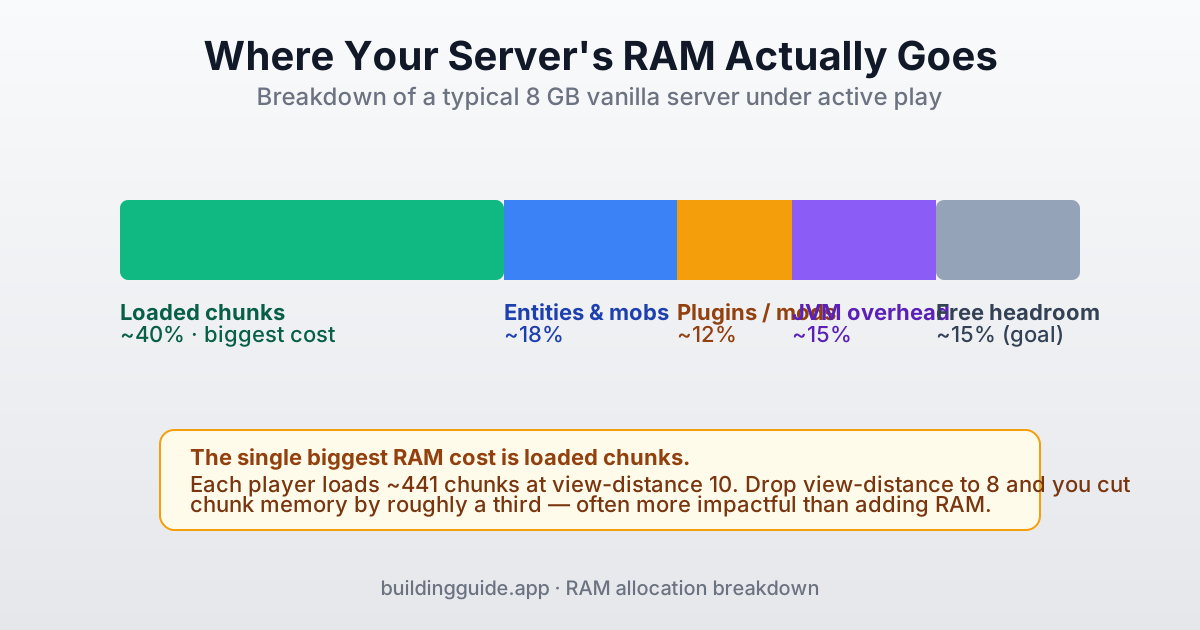
Understanding this split helps you know where to look when things lag. The biggest line is always loaded chunks — every player keeps a square of chunks around them in memory, scaling quadratically with view-distance. Each chunk is ~70 KB of raw block data plus metadata; with 10 players at view-distance 10, you're talking about 4,410 chunks in memory before anything else.
How to Cut RAM Usage Without Buying More
- Drop
view-distancefrom 10 to 8 inserver.properties. You'll save ~35% of chunk RAM. - Set
simulation-distanceto 6. Entities outside this radius stop ticking — huge on servers with mob farms. - Use Paper instead of vanilla. Paper chunks cost less RAM and its garbage collection is tuned for Minecraft.
- Install
Sparkplugin and run/spark heapsummaryto see exactly which classes are eating memory. - Limit
entity-activation-rangefor monsters and animals inpaper-world-defaults.yml.
CPU Requirements
Minecraft's main game loop (the "tick") is single-threaded. That means high clock speed beats lots of cores. A 3.8 GHz 4-core CPU will usually outperform a 2.4 GHz 16-core for Minecraft workloads — the extra cores simply sit idle.
| Server type | Recommended CPU | Why |
|---|---|---|
| Vanilla, <10 players | Any modern 3.5 GHz+ core | Plenty of headroom; the main tick rarely saturates. |
| Vanilla, 10–25 players | 4+ cores at 4.0 GHz+ | Extra cores handle chunk loading & networking off-thread. |
| Modded, 5–15 players | Ryzen 5 / Core i5 class (4.2 GHz+) | Mods add per-tick work that stacks on the main thread. |
| Heavy modpack, any size | Ryzen 7 / i7 class (4.5 GHz+) | Huge tick cost; clock speed is the bottleneck. |
Storage Requirements
For Minecraft, storage speed matters more than storage size. A small NVMe SSD will beat a large HDD on chunk load times every single time. Your world will rarely be huge — even big SMPs stay under 20 GB for the overworld — but chunk IO happens constantly.
- NVMe SSD — ideal. Chunks load instantly, backups are fast, no stutter.
- SATA SSD — fine. Slightly slower than NVMe but a night-and-day upgrade over HDD.
- HDD — avoid. Players will feel micro-stutters when new chunks load, especially with Elytra flight.
Capacity-wise, 20 GB is enough for almost any SMP. Allow 40–60 GB if you run multiple backups or heavy modpacks that generate large world files.
How to Actually Allocate RAM to Your Server
RAM doesn't magically become available to the server — you have to tell Java how much it can use. The -Xms flag sets the initial heap size; -Xmx sets the maximum. Set them to the same value for best performance (no resizing under load):
java -Xms6G -Xmx6G -jar server.jar noguiIf you're on a paid host, this is done for you in the control panel — you just pick the plan. Self-hosted users should add the Aikar flags for better garbage collection on servers with 4+ GB:
java -Xms6G -Xmx6G \
  -XX:+UseG1GC -XX:+ParallelRefProcEnabled \
  -XX:MaxGCPauseMillis=200 -XX:+UnlockExperimentalVMOptions \
  -XX:+DisableExplicitGC -XX:+AlwaysPreTouch \
  -XX:G1NewSizePercent=30 -XX:G1MaxNewSizePercent=40 \
  -XX:G1HeapRegionSize=8M -XX:G1ReservePercent=20 \
  -XX:G1HeapWastePercent=5 -XX:G1MixedGCCountTarget=4 \
  -XX:InitiatingHeapOccupancyPercent=15 -XX:G1MixedGCLiveThresholdPercent=90 \
  -XX:G1RSetUpdatingPauseTimePercent=5 -XX:SurvivorRatio=32 \
  -XX:+PerfDisableSharedMem -XX:MaxTenuringThreshold=1 \
  -Dusing.aikars.flags=https://mcflags.emc.gs \
-jar server.jar noguiHow to Tell If You Have Enough RAM
Use these two tools in-game to measure what your server is actually doing:
/tps— shows ticks per second. 20.0 = perfect. 18.0+ is fine. Below 15.0 is lag./spark heapsummary(Paper or Spigot with Spark plugin) — shows real memory usage after a GC pause.
If TPS is low and heap usage is over 85% consistently, you need more RAM. If TPS is low but heap usage is low, your CPU is the bottleneck — adding RAM won't help.
Common Mistakes
- Allocating 16 GB to a 5-player vanilla server. More RAM isn't always better — oversized heaps mean longer garbage collection pauses.
- Ignoring
view-distance. Dropping from 12 to 8 often solves "we need more RAM" problems for free. - Running Minecraft on an HDD-backed host. Chunks load slowly no matter how much RAM you have.
- Running 32-bit Java. It can't address more than ~1.5 GB. Always use 64-bit Java 21.
- Forgetting the JVM needs headroom. If you allocate exactly your machine's total RAM, the OS runs out and everything crashes.