If you're past the "LAN on my laptop" stage and want a real Minecraft server for your group, the choice usually narrows to two: Minecraft Realms (Mojang's official hosting service) or paid third-party server hosting. Both run 24/7, both work on Java Edition 1.21, but they're built for very different use cases.
This guide breaks down the real differences in 2026 — price, player count, mods, performance, ease of use — and tells you exactly which one to pick based on what you actually want to do.
Quick Verdict
- Pick Realms if you want a zero-setup, official server for 10 or fewer friends playing vanilla Minecraft.
- Pick paid hosting if you want mods, plugins, more than 10 players, better performance, or full control.
- Price-wise they're close. The cheapest decent paid host ($3–$5/mo) undercuts Realms ($8/mo); the premium hosts ($15–$20/mo) cost more but handle way more players.
The Full Comparison
| Feature | Minecraft Realms | Paid Hosting |
|---|---|---|
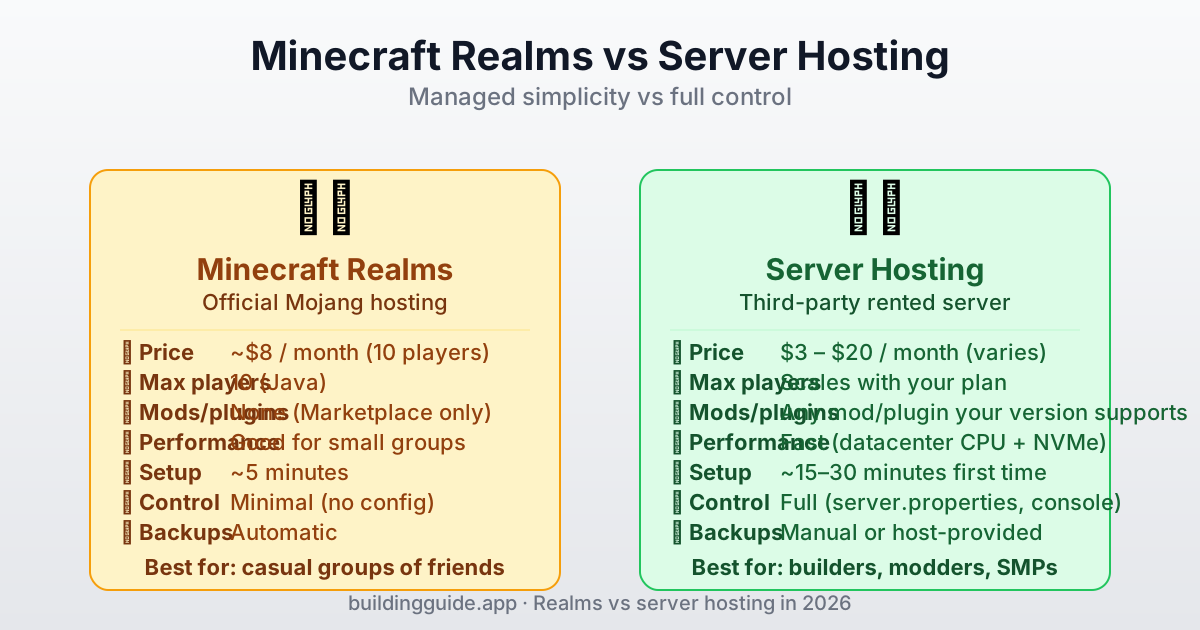
| Monthly cost | ~$8 (10 players) | $3 – $20 (varies by RAM) |
| Max concurrent players | 10 (Java) | Unlimited (by plan RAM) |
| Mods / plugins | ❌ None | ✅ Any mod or plugin |
| Custom server.properties | ❌ Locked | ✅ Full access |
| Admin console | ❌ No | ✅ Full console |
| Custom worlds upload | ✅ Yes | ✅ Yes |
| Automatic backups | ✅ Always on | Most hosts provide |
| Setup time | ~5 minutes | ~15–30 minutes first time |
| Worlds are portable | ✅ Download any time | ✅ Full file access |
| DDoS protection | ✅ Built-in | Depends on host |
Realms: The Deep Dive
Minecraft Realms is a subscription service run by Mojang. When you subscribe, they spin up a server on their infrastructure and wire it directly into your Minecraft client. You pick a world (or upload your own), invite friends, and that's it. No software to install, no files to manage, no ports to open.
What Realms Does Well
- Nothing to set up. You go from "I want a server" to "my friends are joining" in under ten minutes.
- Always online. Runs 24/7 at Mojang's datacenters. Your friends can play even when you're offline.
- Automatic backups. Roll back to any of the last 10 automatic snapshots from the Realms menu.
- Safe for kids and families. Moderated, easy to manage member list, and no exposure to random players.
- No port forwarding, no firewall, no IP sharing. Join straight from the Realms menu.
Where Realms Falls Short
- No mods. You can't install Fabric, Forge, Paper, or any mod framework. Only datapack-free vanilla + whatever is on the official Marketplace.
- No plugins. Want WorldEdit? Griefing prevention? Economy? Anti-cheat? You can't have them.
- Hard 10-player cap. If your SMP grows past 10 regular players, you have to migrate.
- No server.properties tuning. You can't adjust view-distance, simulation-distance, or difficulty on the fly.
- No console access. You can't issue ops commands or check TPS.
Paid Server Hosting: The Deep Dive
A third-party host rents you a slice of a datacenter server. You get a web control panel (Pterodactyl, Multicraft, or a custom one) where you start/stop the server, install plugins, edit server.properties, and upload files. The server lives in the cloud so you never have to keep your PC on.
What Hosting Does Well
- Full control. Any plugin, any mod loader, any server.properties tweak.
- Scales. Want 30 players? Bump RAM. Want a modded server? Pick a bigger plan.
- Performance. Datacenter CPUs and NVMe storage beat almost any home setup.
- Version flexibility. Want to run 1.20.4 and 1.21 side by side? Many hosts let you swap versions in one click.
- Cheaper at the low end. A $3/mo vanilla plan for 5 friends is way under Realms' price.
Where Hosting Gets Annoying
- Some setup. Expect 15–30 minutes to figure out the control panel, install plugins, and configure the server the first time.
- Quality varies wildly. Cheap hosts oversell their hardware; you'll see lag even at 50% RAM. Read independent reviews.
- Backups not always automatic. Some hosts charge extra for managed backups. Always check.
- You're trusting a third party with your world. If the host goes under, you could lose access. Keep local backups.
Which to Pick: Real Scenarios
Scenario 1: Casual Friend Group (3–5 People)
If you just want to play vanilla with a few friends and nobody asked for mods, Realms is probably the right call. The $8/month is worth not dealing with any setup, and auto-backups save you when someone griefs the spawn. If cost is a hard constraint, the cheapest $3–$5/mo paid host ties Realms on ease once you've learned the control panel.
Scenario 2: Serious Builders
Hosting, no question. Builders want WorldEdit, Litematica (client-side but benefits from server performance), and often FastAsyncWorldEdit. You also want to tune view-distance high so you can actually see big builds. Realms locks all of that away.
Scenario 3: Medium SMP (10–25 Players)
Hosting. You'll hit the Realms cap fast, and an SMP wants economy plugins, anti-grief, claims, maybe CoreProtect for rollback. Plan on 6–8 GB of RAM ($10–$15/mo) and install Paper for better performance. Our RAM requirements guide has exact specs.
Scenario 4: Large Community (25+ Players)
Hosting — go big. 16+ GB RAM, a premium CPU (Ryzen 7 / Xeon Gold), and a dedicated IP. At this scale you're basically running a mini-public server. Look at hosts specializing in Minecraft (not general VPS providers) and expect $20–$40/mo.
Scenario 5: Family Server for Kids
Realms. Easy member management, auto-backups, no exposed public IPs, and no chance someone installs a weird plugin. The $8/month is cheap insurance against chaos.
Can I Migrate Between Them?
Yes — both directions work. Realms lets you download your world as a .mcworld file from the Configure Realm menu. Upload that to a paid host's control panel and you're running the same world with plugins and mods enabled. Going the other way, most hosts let you download the world/ folder; zip it, convert if needed, and upload to Realms.
The Actual Pricing Math
If you're pinching pennies, here's the honest breakdown. Realms is a flat $8/month for 10 players. Paid hosting for comparable vanilla performance ranges from $3 to $10 depending on host quality. If your group stays small, paid hosting wins on price. If you grow, you're going to pay more for paid hosting too — there's no such thing as free 30-player hosting.
| Plan | Realms | Budget host | Premium host |
|---|---|---|---|
| 3–5 players vanilla | $8/mo | $3–$5/mo | $8–$10/mo |
| 8–10 players vanilla | $8/mo | $5–$8/mo | $10–$14/mo |
| 10+ players, modded | not supported | $10–$15/mo | $15–$25/mo |
| 20+ players, SMP | not supported | $15–$20/mo | $25–$40/mo |
See our cheapest way to play guide for specific budget breakdowns and how to split costs across friends.